
Verify the corrected value in isolation
Read it slowly and compare it with the intended spelling, date, price, or name. Check punctuation, currency marks, leading zeros, capitalization, and repeated letters.
One correction · everything else protected
Upload a poster, menu, screenshot, or label, quote one wrong word or value, enter the correction, and protect every other letter, number, graphic, and layout element.
Fix a Typo in an Image Without Redesigning It working editor
Prepare the correction
A typo page is narrower than the general text editor. Quote exactly one wrong value and its correction, identify the content type, then tell the model that every unquoted element is outside the task.
Prompt assembled from this task setup
Correct only the quoted misspelled word “SATERDAY” to “SATURDAY”. Keep the correction in the same text area with a similar baseline, scale, color, and visual weight. Preserve all other text, numbers, punctuation, and line breaks, the surrounding alignment, spacing, borders, icons, and artwork, the photo, products, people, background texture, crop, and perspective as close to the source as possible. Do not correct, rewrite, translate, or add anything else.Before and after
This illustrative pottery poster corrects “SATERDAY” to “SATURDAY.” Compare the event title, time, price, supporting copy, paper, tape, window, and shelf to make sure nothing else moved. Exact font matching may require another edit.
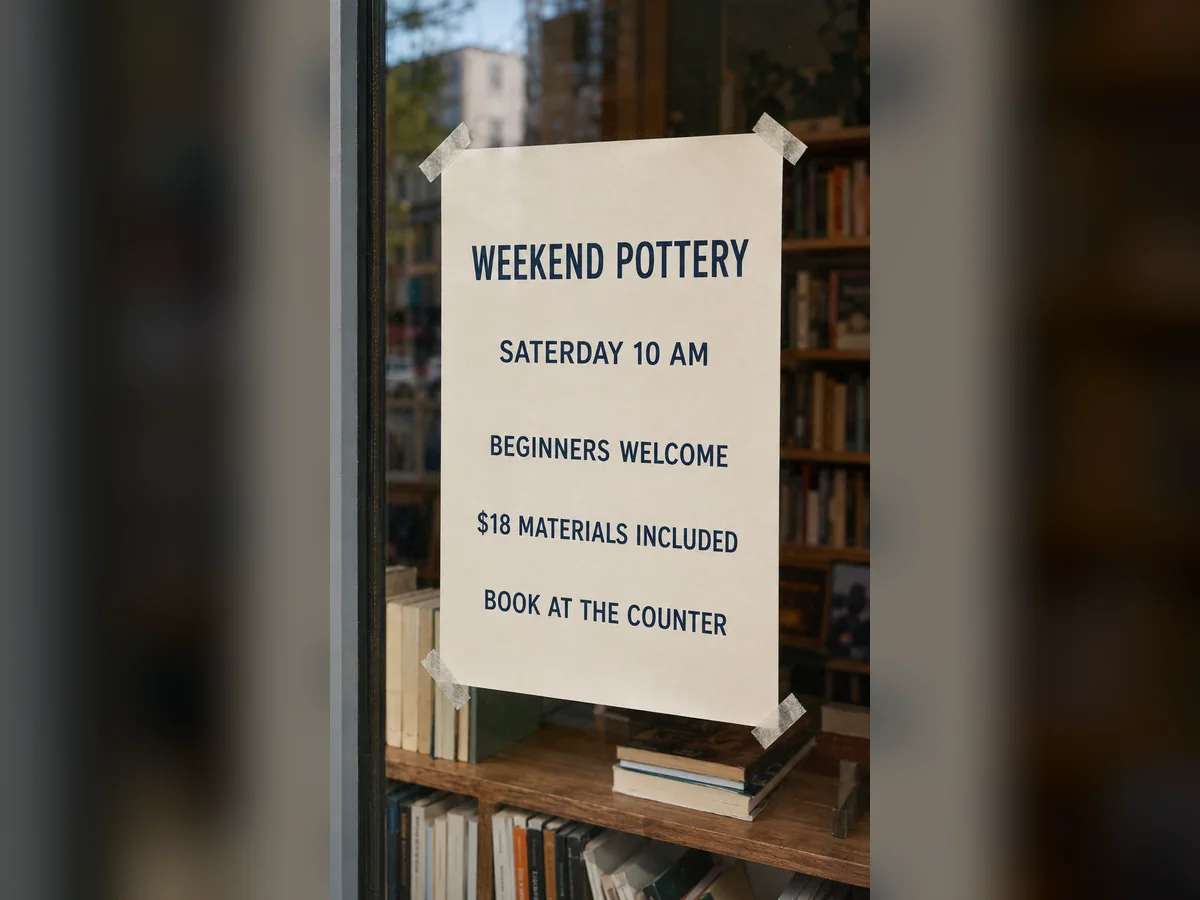
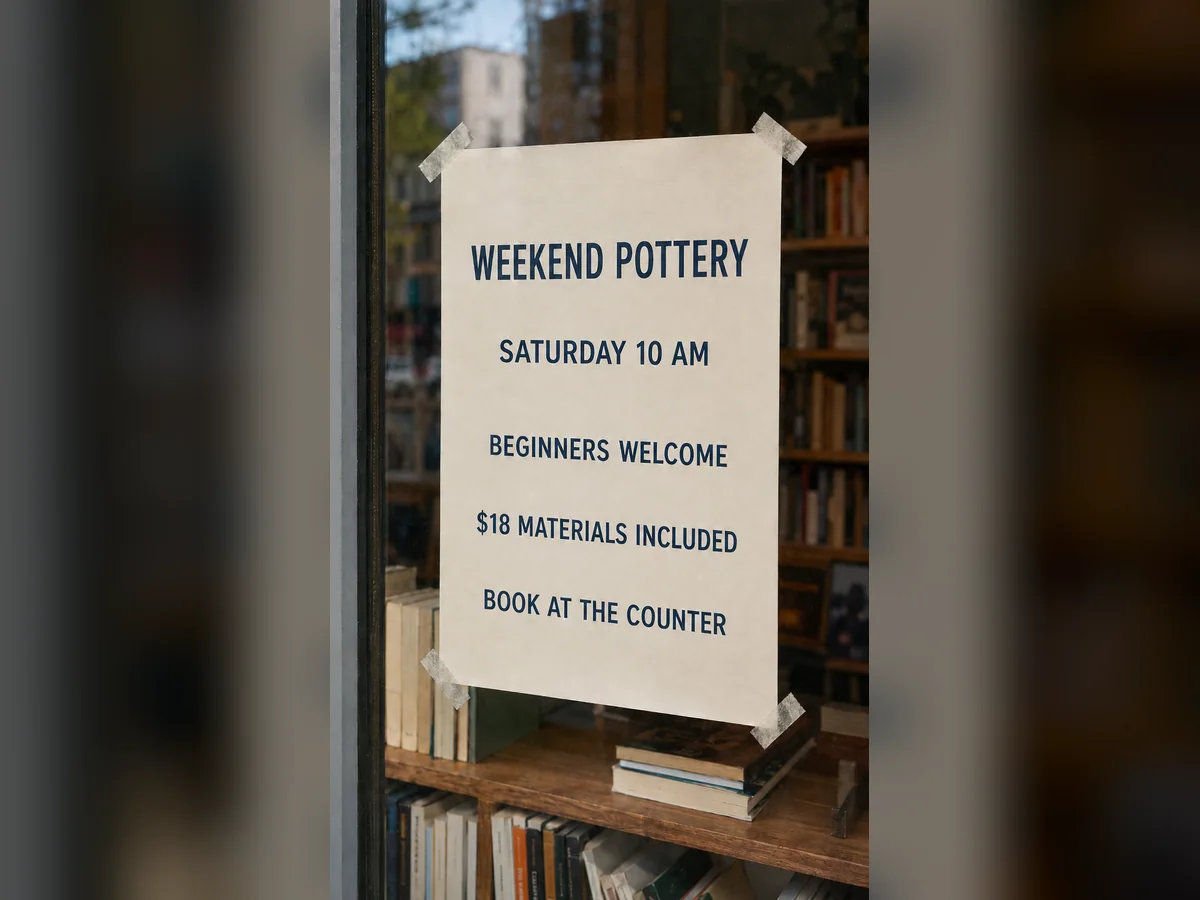
SATERDAY → SATURDAY
Read it slowly and compare it with the intended spelling, date, price, or name. Check punctuation, currency marks, leading zeros, capitalization, and repeated letters.
A correction is not successful if another word or number changes. Compare the whole poster, menu, screenshot, or label with the source before using the result.
An extra character can force smaller type or tighter spacing. Inspect the baseline, line width, nearby border, paper texture, shadows, and any repeated or smeared pixels behind the corrected word.
Control the correction
The correction fields and scope controls make one error explicit. The model still regenerates pixels, so typography, adjacent copy, and background details require deliberate comparison rather than automatic trust.
Quote the wrong word and the correction so the model has a narrow task instead of a general redesign instruction.
Use the same workflow for a spelling mistake, event date, product price, contact detail, or short label.
The model can approximate the nearby type and background, but it does not identify or reuse the exact original font file.
Generative editing can affect nearby pixels or letters, so the workflow includes a deliberate spelling and layout review before download.
Correction patterns
Load a spelling, date, price, or name pattern and replace its quoted values. Keep “change nothing else” meaningful by asking for only one correction per generation.
How it works
The source should make both the typo and its context readable. Quote the wrong and correct values exactly, generate one focused pass, and compare the entire design before export.
Upload the clearest source and type the wrong word exactly as it appears. Mention its location if the phrase appears more than once.
Provide the corrected spelling, date, price, or name and state that no other content should change.
Compare the result with the source. Check every letter, new line break, alignment, background edge, and nearby element before export.
Where it helps
This page is designed for one bounded correction in material you can edit. It is not an appropriate workflow for altering credentials, receipts, records, or other content in order to mislead someone.
Fix one misspelled headline, venue, date, or time without recreating the complete poster.
Correct a dish name, category, or price while checking that every neighboring row stays intact.
Repair a short label, name, or number in an image you own or are authorized to edit.
Input and review advice
Tiny decorative lettering, heavy perspective, blur, compression, and multiple simultaneous errors make generative corrections harder to audit. Use these limits to choose a tighter crop or the original design file when available.
A longer correction may wrap or reduce in size. If it does, try a tighter crop or a shorter approved phrasing.
Several fixes in one dense image increase the amount of copy that must be checked. Separate passes are easier to verify.
Upload images you own or are authorized to modify. Do not change documents, credentials, receipts, or other material to mislead people.
FAQ
These answers explain one generative correction at a time. Exact font matching and untouched surrounding pixels are not guaranteed, so every result needs proofreading and visual comparison.
Upload only images you have permission to edit.Upload the poster, quote the misspelled word and the correction, and ask the model to change nothing else. Compare the full result with the original before downloading it.
You can try with a flat JPG, PNG, or WebP. Clear, straight, high-contrast text and a short replacement are easier for a generative model than tiny or decorative lettering.
The model may create a close visual approximation, but exact font matching is not guaranteed because the product does not detect or reuse the original font file.
Yes. Clearly quote the incorrect and corrected values, describe the location, and check digits, punctuation, spacing, and nearby text after generation.
A longer word can change spacing, scale, or line breaks. Use a tight crop, try a similar-length approved phrase, or regenerate and compare the layout carefully.
Yes. It runs in a modern web browser, so the same upload-and-generate workflow works on macOS, Windows, and supported mobile browsers.
Ready for one correction?
Quote one wrong value, enter the correction, protect every unquoted element, and proofread the complete result before downloading it.